
FLUX.1 SRPO: The AI That Actually Obeys Your Commands
Master Consistent Characters, Style Transfer, and Perfect Text Rendering (No More Six-Fingered Nightmares)
Ever had your brain cooking up the next Mona Lisa, only for the AI to serve you a six-fingered monster instead? Or maybe you tried swapping a product background, and the AI decided to redesign your entire logo while it was at it?
Welcome to the club. We've all been there, refreshing like maniacs, praying to the algorithm gods for just one decent output.
But here's the thing: FLUX.1 SRPO doesn't make you pray. It actually does what you tell it to do. Wild concept, right?
Think of it as upgrading from a tipsy art student who "interprets" your instructions creatively, to a Swiss watchmaker who follows blueprints down to the millimeter. Today, we're breaking down exactly how to turn this powerhouse into your personal creative assistant—one that boosts your success rate from "maybe 1 in 10" to "pretty much every time."
I. More Than Just Another Image Generator
So why are professionals jumping ship to FLUX.1 SRPO?
One word: Obedience.
Most AI models are like that friend who never answers your question directly. You ask for Italian, they take you to a taco truck. FLUX.1 SRPO? It's the friend who shows up on time, brings the wine you asked for, and doesn't try to redecorate your apartment.
Here's where it shines:
For E-commerce Teams
Forget expensive photoshoots. FLUX handles virtual wardrobe changes like a pro. Mask the model's outfit, tell it "swap this for a red silk blouse, keep the original folds and shadows," and boom—new product shot without re-booking the studio.
For Content Creators
Remember when AI-generated text looked like a toddler's keyboard smash? FLUX actually renders readable typography. Tell it "make a sign that says 'FRESH COFFEE,'" and you'll get actual letters, not cryptic runes.
For Designers
Want to turn a regular photo into a cyberpunk illustration without losing the building structure? FLUX's style transfer is a game-changer. It keeps the skeleton (architecture, poses, composition) while completely overhauling the vibe (lighting, texture, color).
II. The Prompt Formula That Actually Works
Stop copying those 500-word "magic spells" from Reddit. FLUX's superpower is understanding normal human language. The more naturally you talk to it, the better it performs.
Here's our Three-Layer Sandwich Method:
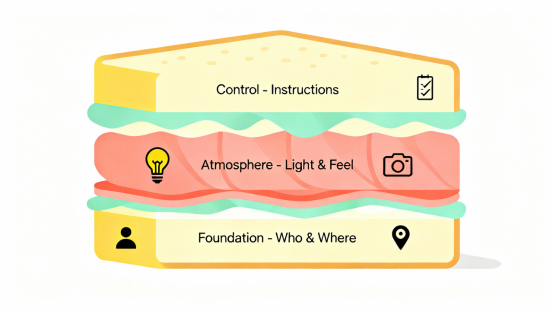
Layer 1: The Foundation (Who & Where)
This is your image's DNA.
Weak prompt: "A woman on a street."
Strong prompt: "A 30-year-old businesswoman in a beige trench coat, standing at Tokyo's Shibuya Crossing in the rain, holding a clear umbrella."

The difference? Specificity. Age, clothing, exact location—these anchor the AI's understanding.
Layer 2: The Atmosphere (Light & Feel)
This separates amateur snapshots from cinematic gold.
Your vocabulary toolkit:
- Lighting: Golden hour glow, Rembrandt lighting (for portraits), neon cyberpunk lights
- Angles: Dutch tilt, bird's eye view, extreme close-up
- Quality: Shot on ARRI Alexa, film grain, Unreal Engine 5 render
Layer 3: The Fine-Tuning (Do This, Not That)
This is where FLUX flexes its muscles. Be explicit about priorities.
Example: "Keep the subject's face razor-sharp, apply heavy bokeh to the background."
III. Advanced Techniques: Let's Get Granular
This is where the magic happens. We're going deep on the techniques that prevent your images from falling apart.
Scenario 1: Style Transfer Without Losing Structure
Goal: Turn a street photo into an anime wallpaper that still looks like the same place.
The "Anchor & Shift" Method:
Step 1: Identify the non-negotiables. What absolutely cannot change? (Building shapes, perspective lines, character positions)
Step 2: Build your prompt logic. Use "maintain/keep/preserve" for anchors, "change/transform/shift" for variables.
Step 3: The actual prompt:
"Convert this urban street photo into Makoto Shinkai's anime style.
CRITICAL: Preserve all building outlines, street perspective, and spatial relationships exactly as shown.
TRANSFORM: Change the sky to a dramatic starry galaxy with shooting stars, boost color saturation to anime levels, and add hand-painted texture to surfaces.
Dreamy atmosphere, late evening lighting."
Why it works: FLUX excels at processing logical instructions. The "preserve X but transform Y" structure gives it clear marching orders.
Scenario 2: Creating Consistent Characters Across Multiple Images
Goal: Generate a series of images featuring the same virtual character without the face morphing into different people.
The "DNA Lock" Technique:
Step 1: Write your character's genetic code.
Create an ultra-specific description:
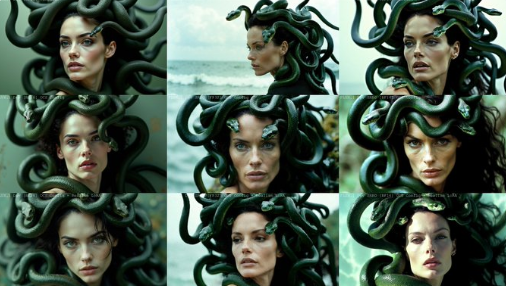
"A woman in her mid-20s with an oval face, subtle freckles across the nose bridge, a small beauty mark below her left eye, shoulder-length auburn hair with natural waves, and light hazel eyes."
Step 2: Copy-paste religiously.
In every single prompt for this character, paste this exact description. Don't change punctuation. Don't paraphrase. Ctrl+C, Ctrl+V like your life depends on it.
Step 3: Only change the context.
- Image 1: "[Character DNA], sitting in a vintage library reading a leather-bound book."
- Image 2: "[Character DNA], jogging through Central Park on a sunny morning."
- Image 3: "[Character DNA], cooking pasta in a modern minimalist kitchen."
Pro move: If the face still drifts slightly, add this at the end: "Maintain exact facial identity from previous generation. Only clothing and environment should change."
Scenario 3: Getting Text Right (Finally!)
Goal: Create a storefront sign with actual readable words.
The "Quote Wrapper" Hack:
Step 1: Decide the physical medium. Is the text on wood? Neon? Printed paper?
Step 2: Use quotation marks as triggers.
Wrap your desired text in single ' ' or double " " quotes.
Step 3: Give context and constraints.
"A hand-painted wooden sign hanging outside a rustic bakery.

The sign clearly displays the text 'ARTISAN BREAD' in elegant serif font.

The lettering is white with subtle gold leaf edges.

Surrounded by hanging flower baskets.

Soft afternoon sunlight."
The result: Crisp, legible text that actually says what you wanted.
IV. Common Mistakes (And How to Dodge Them)
Let's talk about the traps everyone falls into.
Mistake #1: Using Old-School Weight Syntax
The problem: You're still typing ((best quality:1.5)) like it's 2022.
The fix: FLUX doesn't love that syntax. Instead, use natural emphasis:
- "The primary focus should be…"
- "Emphasize the texture of…"
- "Draw special attention to…"
Mistake #2: The "White Background" Disaster
The problem: Typing "white background" often causes washed-out subjects or lost details.
The fix: Give the background context:
- "Clean studio setup with seamless white backdrop"
- "Product photography on white infinity curve"
- "Isolated subject on pure white, studio lighting setup"
Mistake #3: Word Salad Prompts
The problem: "Beach, sunset, girl, smile, 8k, detailed."
Why it fails: FLUX can't figure out how these elements relate. Is the girl on the beach? Is she holding a photo of a beach? Is there a beach-themed smile emoji floating around?
The fix: Use full sentences. "A smiling young woman relaxing on a tropical beach at sunset, shot in 8k resolution."
V. Start Creating: Zero Setup Required
Reading guides is great. Actually making stuff is better.
Here's the issue: Running FLUX.1 SRPO locally is a hardware nightmare. You need a GPU that costs more than a used car, 32GB of RAM, and the patience to troubleshoot Python dependency hell.
XXAI solves this in about 10 seconds.
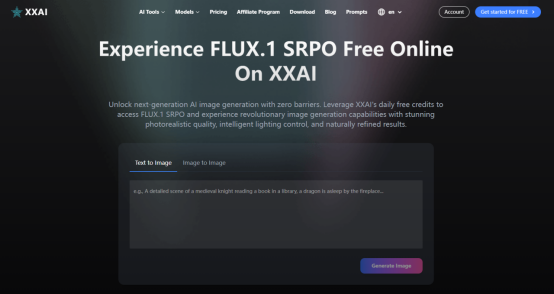
We've built one place for FLUX.1 SRPO. Here's what that means for you:
- No downloads. Open your browser. Start creating. That's it.
- No technical headaches. We handle the backend chaos so you don't have to Google "CUDA version mismatch" at 2 AM.
Your ideas shouldn't wait for a GPU upgrade. Head to XXAI, type your first prompt, and watch your imagination render in real-time.