
GPT-Image-1 Complete Guide: Bring Your Mental Images to Life with AI
Have you ever experienced moments like these—
A brilliant image flashes in your mind, but you can't find suitable material anywhere online; you want to create an event poster, but stare blankly at your design software not knowing where to start; you need visuals for a client proposal, but your budget won't cover a professional photographer…
These frustrations now have a new solution. OpenAI's GPT-Image-1, launched in 2025, is quietly transforming the relationship between ordinary people and image creation. It's not a tool that requires you to memorize complex incantations—it's an AI artist that truly "understands what you're saying."
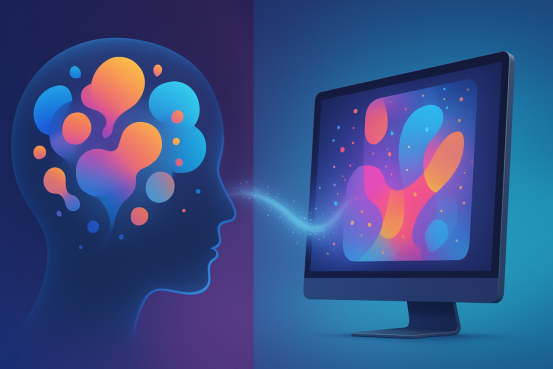
This article will take you from zero to understanding what this tool can actually do and how to use it effectively.
What Makes It Different from Other AI Image Generators?
There's no shortage of AI image generation tools on the market, so what makes GPT-Image-1 special?
Simply put, it's built on GPT-4o—the same large language model behind ChatGPT that can chat with you and help you write articles. What does this mean? It means you can communicate with it as naturally as you would with a human assistant.
Here's an example. Previously, you might have needed to write prompts like this:
"portrait, female, 25 years old, realistic, 8k, detailed skin texture, studio lighting, white background"
Now you can simply say:
"Create a portrait of a professional woman in her mid-twenties who looks confident and capable, with a simple background."
It understands what "confident and capable" translates to in terms of expression and posture, and can interpret what kind of background treatment "simple" requires. Once you've experienced this difference in comprehension, there's no going back.
Several capabilities are worth highlighting:
Text rendering that actually works. Previously, asking AI to include text in images would produce gibberish. GPT-Image-1 can accurately place the text you request into the image—store signs, product labels, poster slogans—all rendered clearly.
Support for editing existing images. You can upload an image and tell it to "change the background to a beach" or "add glasses to this person," and it will make localized adjustments while keeping the main subject intact.
Extremely wide style range. From photorealistic to watercolor illustrations, from cyberpunk to Chinese ink wash painting—it handles everything. You don't need to research which models excel at which styles; one tool does it all.
How to Write Effective Prompts?
Many people think AI image generation is like "opening a mystery box"—good results only come with luck. That's not true. The key is how you describe your needs.
GPT-Image-1's advantage is that it genuinely understands your language, so what you need to do isn't pile on keywords, but clearly "articulate" the image.
I've summarized a simple framework that's proven effective:
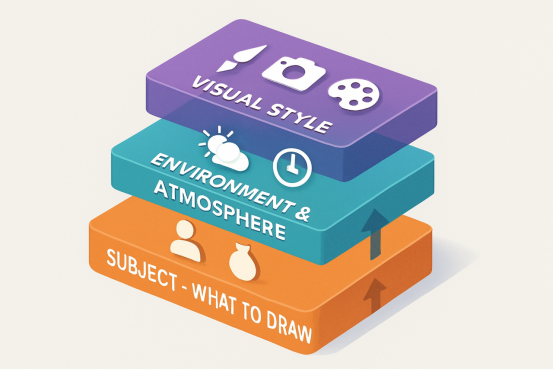
Layer One: Clearly State What to Draw
This is fundamental, yet where problems most easily arise.
Vague description: "A girl on the street"
Specific description: "A high school girl with a ponytail, wearing a school uniform, carrying a backpack, crossing the street with a thoughtful, distracted expression"
What's the difference? The latter provides age, attire, action, and mood, enabling the AI to generate an image with narrative depth rather than a generic figure.
Layer Two: Establish Environment and Atmosphere
Characters alone aren't enough—the setting determines the entire image's emotional tone.
You can add information like:
- Time of day (early morning, dusk, late night)
- Weather (rainy, overcast, sunny)
- Specific location characteristics (Shibuya crossing in Tokyo, old Beijing hutong, Nordic-style café)
- Overall atmosphere (warm, tense, lonely, lively)
For example, the previous example could be expanded to:
"A high school girl with a ponytail, wearing a school uniform, carrying a backpack, crossing the street with a thoughtful, distracted expression. The scene is a Tokyo street at dusk, just after rain, with puddles reflecting light on the pavement. Commuters surround her, and neon signs are beginning to light up. The overall atmosphere carries a subtle melancholy."
Layer Three: Specify Visual Style
The same content rendered in different styles produces completely different results.
Consider these directions:
- Art movements: Impressionism, Ukiyo-e, Pop Art
- Specific artist styles: Miyazaki animation style, Monet's treatment of light
- Medium and materials: oil painting texture, pencil sketch, watercolor wash, cinematic still
- Technical parameters: cinematic quality, soft depth of field, dramatic side lighting
Continuing to expand the previous example:
"…The overall atmosphere carries a subtle melancholy. The visual style should reference Makoto Shinkai's animation aesthetic, with higher color saturation and cinematic lighting."
Real-World Use Cases Across Different Industries
Game Character Concept Design
You're an indie game developer working on a post-apocalyptic RPG and need to design an NPC character.
Sample Prompt:
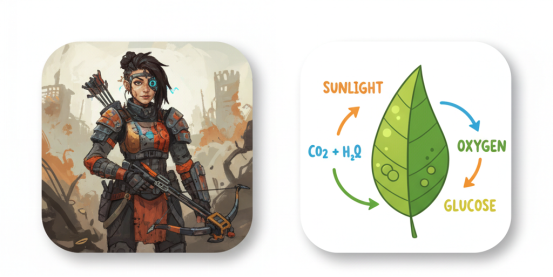
"A full-body character sheet of a female character in a post-apocalyptic wasteland style. Approximately 28 years old, short hair, with an old scar on her left cheek. Wearing a modified old military jacket with one sleeve partially torn off, a homemade tool kit and rusty crowbar hanging from her waist. Torn cargo pants and boots wrapped with cloth strips for reinforcement. Her expression is alert but not fierce, with eyes that tell a story. Standing pose slightly angled, as if ready to spring into action at any moment. Background is solid gray for easy extraction later. Style should reference The Last of Us' realistic art direction, but leaning slightly toward illustration."
Key Points: Character's worldview background, specific clothing details, personality conveyed through appearance, practical background setting (for easy extraction).
Educational Course Materials
You're a teacher preparing a lesson on "photosynthesis" and need a diagram.
Sample Prompt:
"A scientific illustration of plant photosynthesis. The center shows a cross-section of a green leaf, revealing the chloroplast structure. Use arrows to label the process of sunlight entering, carbon dioxide absorption, oxygen release, and glucose production. Style should resemble a textbook illustration with clear, bright colors and appropriate text labels identifying each component."
Key Points: Clear structure, accurate labeling—this is where GPT-Image-1's text rendering capability shines.
Architectural Visualization
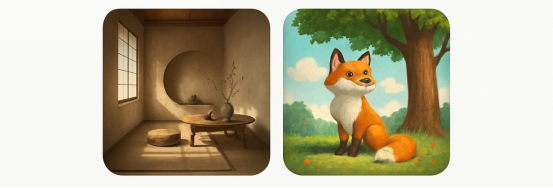
You're an interior designer presenting a Japanese wabi-sabi style living room concept to a client.
Sample Prompt:
"An interior design rendering showcasing a Japanese wabi-sabi style living room. Approximately 30 square meters with high ceilings and floor-to-ceiling windows facing a small courtyard. Overall color palette of warm off-white, natural wood, and gray-brown tones. Walls have a subtly textured lime plaster finish; flooring is light-colored terrazzo. Minimal furniture: a low wooden coffee table with two linen-colored floor cushions beside it; in the corner, a rough ceramic vase holding a single bare branch. Black thin-framed floor-to-ceiling windows reveal the courtyard with moss, gravel, and a small maple tree. Natural light from 3-4 PM angles in through the windows, casting window frame shadows on the floor. Overall atmosphere is quiet, spacious, and breathable. Perspective from the room entrance looking toward the windows, slightly angled to one side. High-definition photorealistic quality, like architectural magazine photography."
Key Points: Spatial scale, material details, furniture placement, light timing and direction, perspective angle—the more complete this information, the more accurately the AI can realize your design vision.
Children's Picture Book Illustration
You're a picture book author creating a story about a little fox's adventure and need an illustration for one page.
Sample Prompt:
"A children's picture book style illustration. A small fox stands beneath a massive old oak tree, looking up at a mysterious lantern hanging from its branches. The fox is orange-red with round, curious eyes and a fluffy tail. The ancient oak is enormously thick, with bark patterns resembling a face, giving the impression the tree is alive and sentient. The lantern emits warm yellow light, especially striking in the dusky forest. Fallen leaves and mushrooms cover the ground, with distant trees silhouetted in deep blue against the sunset. Overall style is hand-painted watercolor with warm but not harsh colors, soft brushstrokes, and subtle paper grain texture. Atmosphere is cozy with a touch of mystery, suitable for picture books for ages 3-6."
Key Points: Clear target age group, character emotion and personality, narrative setting (this is a story moment), style appropriate for printing and children's aesthetics.
Wedding Invitation Illustration
A friend asks you to help design a wedding invitation with a vintage romantic illustration.
Sample Prompt:
"A vintage romantic wedding illustration for invitation design. The image shows a couple's silhouettes in profile, kissing, with elegant contours. They stand beneath an archway in a European-style garden, with the arch covered in blooming roses and ivy. The background shows sunset afterglow, with sky transitioning from orange-pink to pale purple. Flower petals are scattered on the ground. Overall style resembles vintage illustration, somewhat like early 20th-century European engravings, with delicate line decorations and soft colors. Leave blank borders around the image for adding text later. Warm-toned palette that's romantic but not tacky. At the arch's apex, include a heart-shaped ornament where the letters 'L & M' can be written."
Key Points: Clear purpose (invitation illustration requiring text space), specific style reference, atmosphere control (romantic but not tacky is a precise aesthetic requirement), preset text elements.
Common Pitfalls to Avoid
Pitfall 1: Descriptions Too Short and Abstract
Prompts like "draw a flower" give all decision-making power to random AI generation. The result may be completely different from what you wanted.
Pitfall 2: Contradictory Requirements
"Create a minimalist image with lots of intricate details"—this puts the AI in an impossible position. Clarify what you actually want before giving instructions.
Pitfall 3: Forgetting to Specify Image Purpose
A "coffee shop" for mobile wallpaper versus an outdoor billboard requires completely different compositions. State clearly in your prompt "this image is for a social media cover, 16:9 ratio" to save considerable post-production adjustment.
Pitfall 4: Wanting Too Much at Once
"The image should have mountains, ocean, city, forest, people, animals…" Too many elements create chaos. Determine the core subject first; everything else is supporting.
Pitfall 5: Not Providing Style References
"Make it look nice" is meaningless. The AI doesn't know what your "nice" means. Provide specific style references—a particular artist, film, or art movement—much more useful than adjectives.
Experience GPT-Image-1 on XXAI

After all this discussion, you probably want to try it yourself. The XXAI has integrated the GPT-Image-1, where you can directly experience all the features mentioned:
- Describe your desired image using natural language
- Generate images in various styles
- Accurately render text content within images
Whether you work in design, marketing, education, or simply want to explore AI art generation, this tool is worth trying.
Open XXAI, find GPT-Image-1, and describe that image in your mind—see if AI can bring it to life for you. You might discover that creation is simpler than you imagined.