
Kling 2.5 Prompt Guide: 70+ Camera Movement Commands & Scene Applications for Creating Cinematic Footage at Zero Cost

Many creators hit a bottleneck when using AI to generate videos: the image clarity is there, but the footage feels stiff and lifeless—more like "moving photographs" than actual videos. The truth is, what determines video quality goes beyond resolution; it's all about camera movement.
One of Kling 2.5's core strengths lies in its deep understanding of physics and cinematic language. Instead of simply morphing visual elements, it operates like a real cinematographer—pushing, pulling, panning, and orchestrating light and shadow.
We're providing you with a comprehensive Kling 2.5 cinematography and prompt dictionary. Covering four major sections—basic camera movements, dynamic tracking, focus control, and special perspectives—this guide will help you precisely control AI to generate professional, cinematic shots.
Part 1: Core Camera Movement Command Library: Teaching AI to Speak Director's Language
To get Kling 2.5 to execute your vision accurately, you must incorporate proper cinematography terminology into your prompts. Below, we've categorized movements by type with ready-to-copy prompt codes.
1. Depth Movement (Creating Breathing Room & Immersion)
These shots guide viewer attention through physical distance changes, either focusing closer or revealing the bigger picture.
| Camera Term | Prompt Command (Copy-Ready) | Application Scenarios & Effect Analysis |
|---|---|---|
| Slow Dolly In | Camera moves slowly forward towards the subject, cinematic lighting, depth of field. | Emotional Build-up: Use when showing a character discovering secrets, gazing at the camera, or showcasing core product details. Creates a "breathless" sense of pressure or focus. |
| Crash Zoom | Fast zoom in onto the character's shocked expression, intense atmosphere. | Dramatic Conflict: Perfect for plot twists, shocking moments in short videos, or comedic emphasis. |
| Dolly Out | Camera pulls back smoothly to reveal the vast environment surrounding the lonely figure. | Narrative Elevation: Typically used for video endings. Pulling from detail (a single flower) to wide shot (a field of flowers) reveals the relationship between subject and environment, sparking viewer imagination. |
| Dolly Zoom (Vertigo Effect) | Dolly zoom effect (Vertigo shot), the background perspective distorts while the subject size remains constant. | Psychological Thriller: An advanced technique where the background stretches while the subject stays fixed. Perfect for depicting extreme inner turmoil, fear, or worldview collapse. |
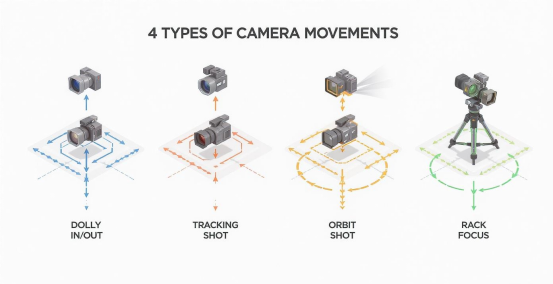
2. Horizontal & Vertical Movement (Establishing Environment & Character Relationships)
These shots maintain constant distance from subjects while moving parallel, commonly used to document processes.
| Camera Term | Prompt Command (Copy-Ready) | Application Scenarios & Effect Analysis |
|---|---|---|
| Truck/Tracking | Side tracking shot matching the speed of the running car, motion blur on background. | Dynamic Presentation: Perfect for filming running people, moving vehicles, or sprinting pets. Viewers feel like they're "moving alongside," creating strong engagement. |
| Pedestal Up/Down | Camera moves vertically up from the rainy street level to the neon sign on the building roof. | Spatial Layering: Showcases building height, tree growth, or transitions from ground puddle reflections to reality, creating powerful visual tension. |
| Pan Left/Right | Slow pan right across the busy office room, capturing different employees working. | Group Portrait: When scenes contain multiple subjects (parties, meetings, landscapes), use panning to establish the full picture and relative positions. |
3. Orbit & Rotation (360° Showcase & Technical Prowess)
Kling 2.5's physical consistency particularly shines in rotation shots, avoiding object distortion during movement.
| Camera Term | Prompt Command (Copy-Ready) | Application Scenarios & Effect Analysis |
|---|---|---|
| Orbit Shot | 360-degree orbit camera movement around the standing model, showcasing the outfit details. | Subject Highlight: Standard shot for e-commerce product displays, fashion showcases, and vehicle exterior presentations. |
| Camera Roll | The camera rolls 90 degrees clockwise while following the flying bird, disorienting view. | Artistic Expression: Mimics fighter jet or dreamscape perspectives, breaking horizon balance to create dizzying, dreamlike, or weightless artistic effects. |
| Spiral Up | Spiral camera movement rising upward around a magical tower. | Epic Feel: Common in fantasy themes and architectural showcases, creating grand, sacred, or magical atmospheres. |

4. Focus & Special Perspectives (Elevating Visual Quality)
Guiding vision through focus changes and simulating real experiences through special camera positions.
| Camera Term | Prompt Command (Copy-Ready) | Application Scenarios & Effect Analysis |
|---|---|---|
| Rack Focus | Rack focus from the rain droplets on the window glass to the sad person standing outside. | Attention Guidance: Tells two-layered stories within a single shot. First foreground (foreshadowing), then background (revelation)—deeply cinematic. |
| POV (First Person) | POV shot of hands typing on a mechanical keyboard, monitor screen visible in front. | Immersive Experience: Perfect for tutorial demonstrations, gaming perspectives, and vlog recordings. Makes viewers feel "this is what I'm doing." |
| Drone Shot | High altitude drone shot flying over a tropical island, establishing shot. | Opening Scene Setter: Establishes the big environment, ideal for travel videos and city promotional film openings. |
| FPV Drone | Fast FPV drone flying through narrow gaps in a forest, motion blur, adrenaline rush. | Extreme Speed: Faster and more daring than regular aerial shots. Perfect for depicting speed and traversal with powerful visual impact. |
Part 2: Scenario-Based Practice: How to Create Resonant Prompts?
Camera movement vocabulary alone isn't enough—great videos need "storytelling." Below, we demonstrate how to integrate the above movements into prompts through real-life scenarios to create resonant footage.
1. Corporate & Commercial: From Boring to Professional
Scenario: Create a video showcasing efficient team collaboration for company promotion.
Generic Prompt: People working in an office. → Result: Lifeless surveillance footage.
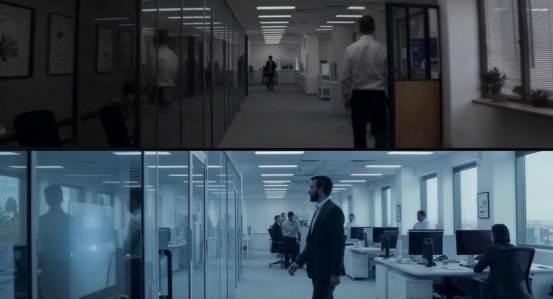
Kling 2.5 Optimized Prompt: Low angle, slow dolly in through a busy modern office corridor. On the left, a team is brainstorming at a whiteboard; on the right, a programmer is typing intently. Soft depth of field, cool blue tone, cinematic lighting.**
Analysis: Added "low angle" for spatial depth, "slow dolly in" for flow, specific left-right action descriptions enrich content.
2. E-commerce & Products: From Bland to Luxurious

Scenario: Showcase a newly launched moisturizing lipstick.
Generic Prompt: A red lipstick → Result: Uninspiring product still.
Kling 2.5 Optimized Prompt: Extreme close-up, macro lens. The lipstick texture slowly rotates. Water droplets slide down the smooth red surface. Soft rack focus to the brand logo in the background. High-end commercial lighting.
Analysis: Uses "macro" for texture detail, "rotation" for full view, "rack focus" to reveal brand—seamlessly executed.
3. Life & Emotion: From Recording to Memory
Scenario: Express longing or nostalgia with a beach sunset scene.
Generic Prompt: A girl at the beach during sunset. → Result: Tourist snapshot.
Kling 2.5 Optimized Prompt:
Backlight silhouette shot. Handheld camera movement following a girl running on the beach towards the sunset. Lens flare effects, hair blowing in the wind, slow motion, nostalgic atmosphere.
Analysis: "Handheld camera" creates subtle shake crucial for authentic memories; "backlight" and "slow motion" amplify emotion.
Part 3: Kling 2.5's Unique Advantages: Beyond Just Movement

Understanding Kling 2.5's distinctive features helps you craft prompts that align perfectly with its capabilities:
1. Physical Simulation Realism:
Kling 2.5 understands gravity, fluid dynamics, and fabric properties.
Try prompts: "Melting ice cream dripping down" or "Silk scarf floating in the wind." Generated liquids and fabrics won't exhibit physics-defying distortions.
2. Large Movement Continuity:
While older models struggle with characters making sharp turns or running, Kling 2.5 excels here.
Try prompt: "A dancer doing a 360-degree spin jump." You'll find limb structure remains stable.
3. Spatiotemporal Consistency:
In longer video generation, Kling 2.5 maintains character appearance consistency, avoiding "face changes every few steps."
Where to Use Full-Powered Kling 2.5?
Having mastered this "director-level" prompt system, the next step is finding an excellent creation platform to bring them to life.
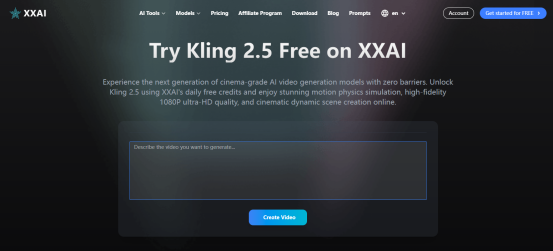
XXAI is your ideal choice for experiencing the Kling 2.5 video model. It not only provides direct access to this powerful video generation tool but also solves creator pain points through these differentiated advantages:
1. 100 Daily Free Credits – Zero-Cost Experimentation
Video generation often requires multiple prompt iterations to achieve perfection. At XXAI, all users receive 100 free daily credits. This means unlimited opportunities to test the camera movement commands above and practice AI control without worrying about expensive fees—creativity never gets stuck on budget constraints.
2. One-Click Model Switching – Build Super Workflows
Excellent videos require great scripts and covers.
At XXAI, you have an AI Dream Team:
Script Phase: Switch to GPT-5.2 or Claude 4.5 for shot-by-shot script writing
Art Phase: Switch to Nano Banana or Flux series for high-aesthetic reference images or cover art
Video Phase: Seamlessly access Kling 2.5, supporting text-to-video and image-to-video
All operations under one account—no juggling dozens of browser tabs or logging in and paying across different tools.
3. Efficient & Stable – Focus on Creation
XXAI provides extremely smooth access with an optimized multilingual interface, fast model response times, eliminating long waits between inspiration and final product.
Final Summary:
Video creation's essence is "control." Prompt Formula = Subject + Action + Environment + Camera Movement Command + Lighting Atmosphere.
Now, armed with this guide, head to XXAI and use your free daily credits. Whether generating product ads or capturing virtual travel memories, Kling 2.5 will surprise you.