
Gemini 2.5 Flash Image (Nano Banana): A Complete Guide to Features, Capabilities & Free Access on XXAI

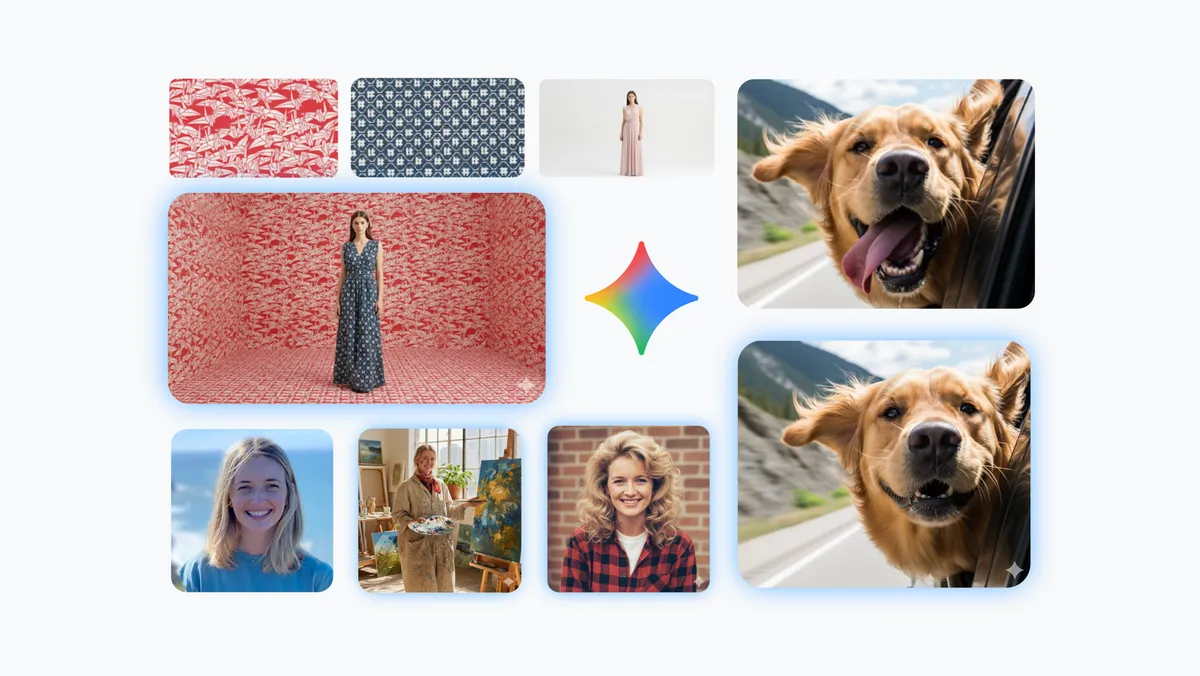
Gemini 2.5 Flash Image (Nano Banana) represents Google’s newest approach to lightweight, fast, and creatively flexible image generation. While large models often focus on raw power and computation-heavy pipelines, Nano Banana is designed with a different philosophy: give users a responsive, intuitive, iteration-friendly model that can move as fast as their ideas.
Whether you're sketching new concepts, refining visuals through natural language, or merging images into entirely new scenes, Nano Banana provides an accessible yet surprisingly advanced toolkit. Its multimodal architecture and contextual understanding make it feel more like a creative partner than a traditional one-shot image model.
What Sets Nano Banana Apart (And Why It Feels So Different to Use)
1. True Multimodal Understanding
Nano Banana processes text and images natively within the same reasoning flow. This means:
- It doesn't guess what you meant—it reads both modalities together.
- Edits and refinements stay aligned with your intent, even when instructions are vague.
- It can reinterpret earlier steps while preserving essential structure.
This unified processing is the backbone of its stability and creative accuracy.
2. Context Retention for Iterative Editing
Most lightweight image models treat each prompt as a clean slate. Nano Banana doesn’t. It remembers what it generated, allowing you to build on prior results without losing continuity.
This enables:
- Consistent characters across multiple scenes
- Style-stable sequences for storytelling or branding
- Progressive refinements without re-uploading the same prompt
- Step-by-step adjustments (light, pose, colors, expressions)
In practice, this makes Nano Banana feel conversational—almost like interactive visual brainstorming.
3. Real-World Reasoning and Visual Logic
Because it's built on the broader Gemini architecture, Nano Banana benefits from:
- Practical spatial reasoning
- Physics-aware outputs
- Clean object relationships
- Fewer distorted faces, limbs, or backgrounds
This reduces the number of “fix runs” you typically need with smaller image models.
4. Lightweight, Fast, and Surprisingly Capable
Nano Banana’s smaller size doesn’t limit what it can do—instead, it enhances:
- Responsiveness
- Speed of iteration
- Ease of running multiple variations
- Efficiency across mixed editing tasks
For creative exploration or rapid prototyping, this agility matters more than raw model size.
Core Capabilities: What You Can Actually Do With Nano Banana
Below are the model’s strongest and most practically useful abilities, explained with real-world use cases.
1. Character Consistency Across Multiple Scenes
Nano Banana maintains character identity—facial structure, hair, features, style—even as you modify:
- Clothing
- Backgrounds
- Poses
- Lighting
- Environments
Perfect for:
- Character design pipelines
- Social media avatar series
- Storyboards and webcomics
- Animation planning
- Visual brand personas
This is one of the rare lightweight models that can achieve continuity without requiring reference-image hacks.
2. Multi-Image Fusion & Creative Compositing
Nano Banana lets you upload up to three images and blend them into a new creation. For example:
- Combine a person from one image, a background from another, and an object from a third
- Merge artistic textures or materials
- Rebuild incomplete scenes by pulling elements from different photos
- Generate surreal compositions or stylized collages
This feature is incredibly useful for designers who need idea mashups quickly.
3. Natural-Language Local Editing (No Tools Needed)
With plain English instructions, you can:
- Remove unwanted objects
- Replace the background
- Fix distorted areas or restore damaged regions
- Change outfits or textures
- Redraw specific zones (“make the lighting softer on the left side”)
- Modify expressions, gestures, or small details
It’s essentially a conversational photo editor—fast, flexible, and intuitive.
4. Style Transfer and Material Exploration
You can take the style of one image (e.g., watercolor, neon, retro anime, 3D render, product photo lighting) and apply it across:
- Products
- Fashion items
- Room interiors
- Characters
- Branding concepts
Or you can explore material variations like:
- metal → glass
- cloth → leather
- matte → reflective
Perfect for design workflows and prototyping.
5. Multiple Creative Variations from One Prompt
A single prompt can generate diverse visual directions:
- Different compositions
- Multiple lighting moods
- Variant artistic styles
- Alternative layouts
This accelerates brainstorming significantly—especially when you need a palette of options.
6. Clean, Accurate Text Rendering
One of the standout improvements is Nano Banana’s ability to generate:
- Legible text
- Centered, stable typography
- Labels, posters, packaging, UI mockups
- Diagrams and signs
This puts it ahead of most small image models, which usually struggle with text accuracy.
Getting Started with Nano Banana for Free on XXAI
Keeping up with every new paid AI tool can get overwhelming — especially when all you want is to test a model before committing to another monthly subscription. I wanted to try Nano Banana’s upgraded image generation, editing control, and multi-image composition features, but paying for a full plan just to experiment didn’t feel practical. That’s why discovering XXAI made things so much easier.
XXAI lets you access Gemini 2.5 Flash Image (Nano Banana) without any subscription barrier. For my creative workflow — whether I’m generating concept art, refining visuals through conversational edits, or testing how well the model handles character consistency — that freedom is invaluable. You can explore everything Nano Banana offers at your own pace, without being locked into a single platform.
Getting started is straightforward:
- Go to XXAI
- Select Gemini 2.5 Flash Image (Nano Banana)
- Test it with something from your real life
What makes XXAI even better is that it isn’t tied to just one AI model. It brings together multiple top-tier systems in one clean interface, and Nano Banana is simply one of the highlights. Being able to compare models side-by-side, try different creative directions, and switch tools depending on what I’m building makes the whole process feel more flexible and efficient.
That’s why XXAI feels like the smartest way to use Nano Banana — not just because you can start for free, but because it gives you a central space to experiment, test ideas, and discover which model truly fits your creative needs.